
Garmin widgets for your iPhone Home Screen & Lock Screen
WristGrid turns supported Garmin watch data into native iPhone widgets, with Garmin-native metrics plus WristGrid-derived sleep and recovery scores on a compatible Garmin setup.

No. WristGrid puts your Garmin on the Home Screen.
Garmin Connect does not offer native iPhone Home Screen or Lock Screen widgets. Pair a Garmin watch listed for GW Bridge on the Connect IQ Store, install the companion, then use WristGrid on iPhone.
 GW Bridge on your watchConnect IQ companion for selected Garmin-native metrics. Get it on Connect IQ
 WristGrid on iPhoneKeeps a local snapshot of your readings. No account.
 Widgets on both screensAdd them from the widget gallery, the same way you add any iOS widget.

Glanceable data on the surfaces you use.
Home Screen widgets come in small and medium sizes; Lock Screen widgets are circular, rectangular, and inline.
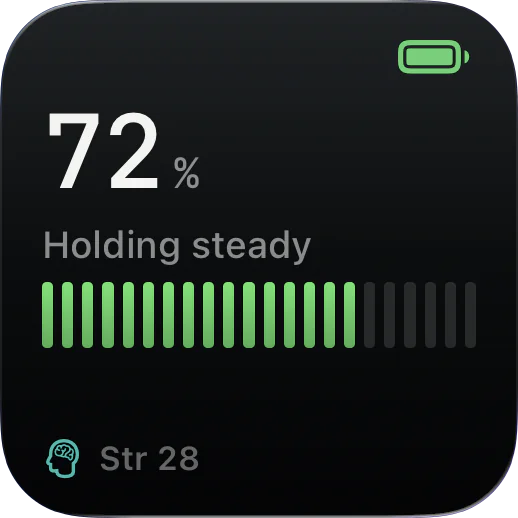
Body Battery
Current Body Battery level from your Garmin.

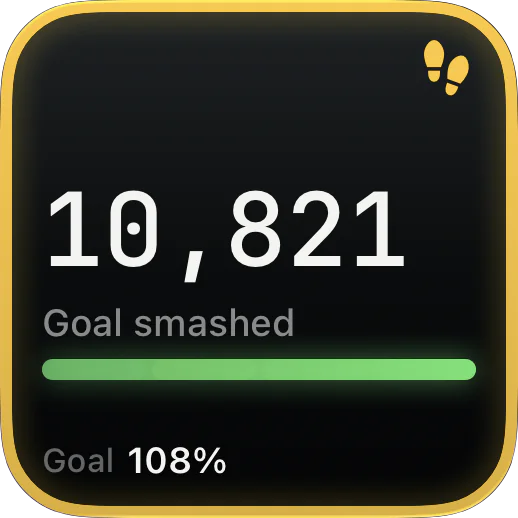
Steps Today
Today's step count and progress toward your Garmin goal.
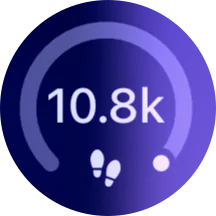

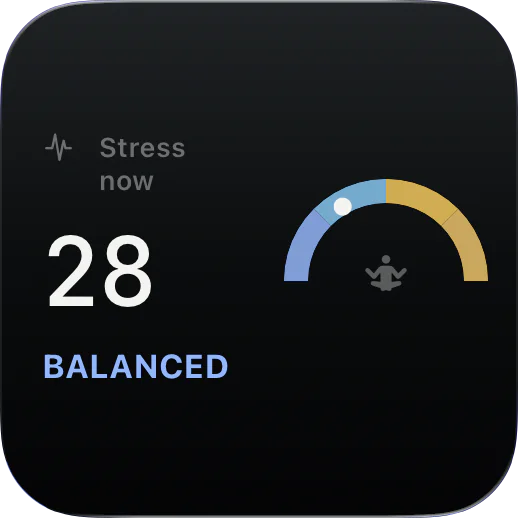
Stress
Current stress level with band gauge.
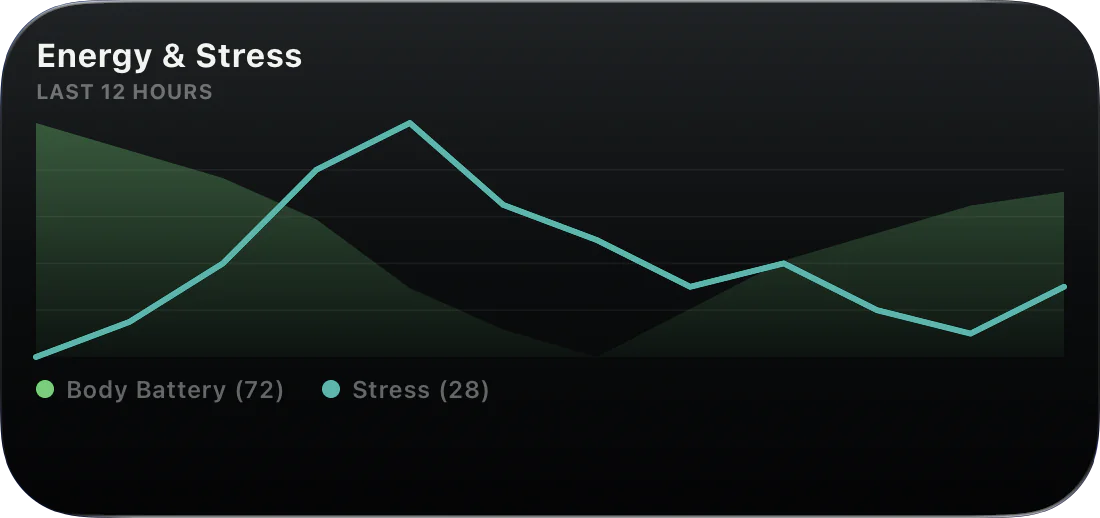
Energy & Stress
Dual-line chart of Body Battery draining against stress spikes.
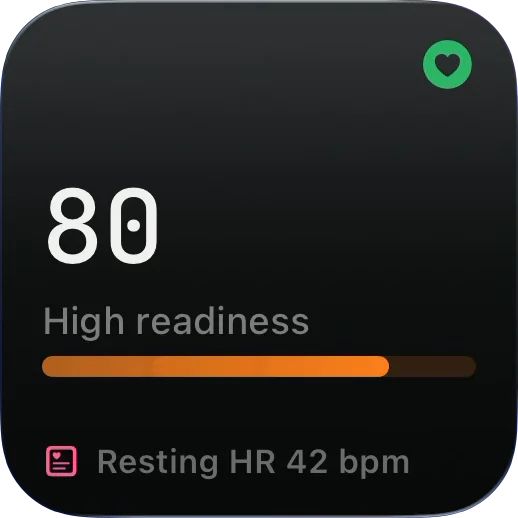
Readiness
0 to 100 readiness from sleep, resting HR, stress, and Body Battery.
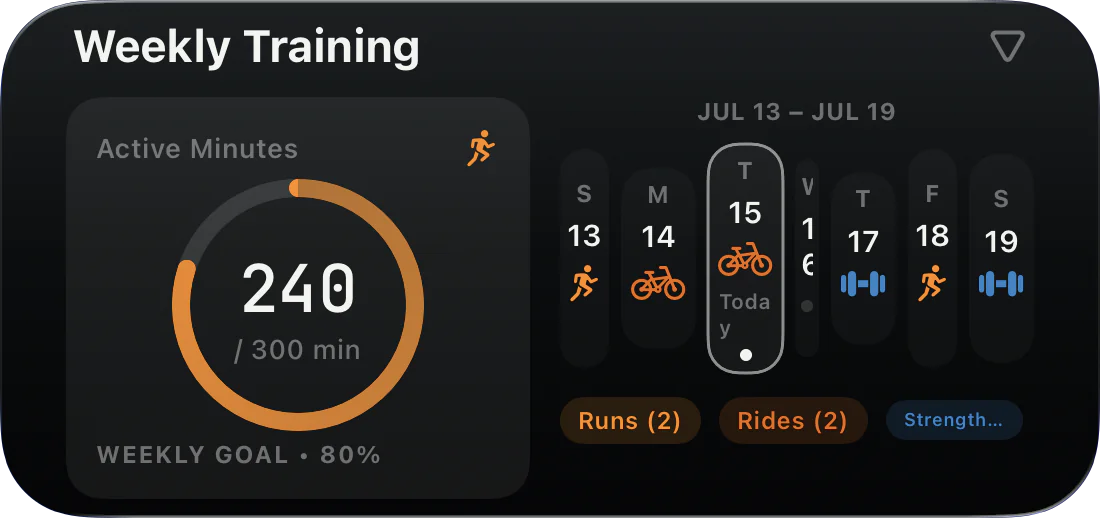
Weekly Training
Weekly active minutes and a workout calendar from Apple Health.


Just ask Siri how you slept.
Siri and Shortcuts answer from WristGrid: Body Battery, sleep, stress, steps, readiness, recovery, resting heart rate, your last workout and yesterday, in English and Spanish.
What data WristGrid shows.
WristGrid keeps watch-native readings separate from scores and training context it computes in the app.
Garmin-native metrics
- Steps, step goal, calories, distance, floors, and active minutes
- Body Battery, heart rate, resting heart rate, respiration, and stress
- Recovery time, VO2max, SpO2, activity history, and sensor history
Computed by WristGrid
- Sleep score
40% duration30% structure30% efficiency
- Recovery score
35% sleep25% resting HR25% stress15% Body Battery
- Training load: TRIMP, 7-day acute, and 42-day chronic load
Optional Apple Health (HealthKit) is read-only; when used, WristGrid filters it to Garmin-originated records.
Concrete privacy, clear product boundaries.
- No accountWristGrid requires no account.
- Health data stays on your iPhoneYour health data is not uploaded to the cloud; widgets read local cached snapshots.
- Analytics you can turn offAnalytics can be turned off in settings. Read the privacy policy
- IndependentWristGrid is an independent product, not affiliated with, endorsed by, or sponsored by Garmin.
App Privacy
As listed on the App Store.
- Purchases
- Identifiers
- Usage Data
- Diagnostics
- User Content
Widgets never call Garmin or the network directly. WidgetKit controls timing, typically within 15 to 60 minutes.
Works with the watches listed on Connect IQ.
WristGrid works with every Garmin watch listed for GW Bridge on the Connect IQ Store. Requirements and refresh limits are spelled out here.
- iPhone with iOS 18 or later
- Garmin Connect Mobile installed
- GW Bridge on a compatible watch
- Bluetooth turned on
Every watch listed for GW Bridge
Forerunner
- Forerunner 55
- Forerunner 70
- Forerunner 165
- Forerunner 165 Music
- Forerunner 170
- Forerunner 170 Music
- Forerunner 245
- Forerunner 245 Music
- Forerunner 255
- Forerunner 255 Music
- Forerunner 255S
- Forerunner 255S Music
- Forerunner 265
- Forerunner 265S
- Forerunner 570 (42mm)
- Forerunner 570 (47mm)
- Forerunner 745
- Forerunner 945
- Forerunner 945 LTE
- Forerunner 955 Dual Power
- Forerunner 965
- Forerunner 970
fēnix
- fēnix 5 Plus
- fēnix 5S Plus
- fēnix 5X Plus
- fēnix 6
- fēnix 6 Dual Power
- fēnix 6 Pro
- fēnix 6 Pro Dual Power
- fēnix 6 Pro Solar
- fēnix 6 Solar
- fēnix 6S
- fēnix 6S Dual Power
- fēnix 6S Pro
- fēnix 6S Pro Dual Power
- fēnix 6S Pro Solar
- fēnix 6S Solar
- fēnix 6X Pro
- fēnix 7
- fēnix 7 Pro
- fēnix 7 Pro (Solar Edition, No Wi-Fi)
- fēnix 7S
- fēnix 7S Pro
- fēnix 7X
- fēnix 7X Pro
- fēnix 7X Pro No Wi-Fi
- fēnix 8 AMOLED (43mm)
- fēnix 8 AMOLED (47mm/51mm)
- fēnix 8 Pro
- fēnix 8 Solar (47mm)
- fēnix 8 Solar (51mm)
- fenix 9 (43 mm)
- fenix 9 (47 mm)
- fenix 9 Pro (43 mm)
- fenix 9 Pro (47 mm)
- fenix 9 Pro (51 mm)
- fenix 9 Pro (Solar 47 mm)
- fenix 9 Pro (Solar 51 mm)
- fēnix E
epix
- epix (Gen 2)
- epix Pro (42mm)
- epix Pro (47mm)
- epix Pro (51mm)
Enduro
- Enduro
- Enduro 2
- Enduro 3
Venu
- Venu
- Venu 2
- Venu 2 Plus
- Venu 2S
- Venu 3
- Venu 3S
- Venu 4 (41 mm)
- Venu 4 (45 mm)
- Venu Sq.
- Venu Sq. 2
- Venu Sq. 2 Music
- Venu Sq. Music
- Venu X1
vívoactive
- vívoactive 4
- vívoactive 4S
- vívoactive 5
- vívoactive 6
Instinct
- Instinct 2
- Instinct 2S
- Instinct 2X
- Instinct 3 (45 mm, AMOLED)
- Instinct 3 (45 mm, Solar)
- Instinct 3 (50 mm, AMOLED)
- Instinct 3 (50 mm, Solar)
- Instinct Crossover
- Instinct Crossover AMOLED
- Instinct E (40 mm)
- Instinct E (45 mm)
MARQ
- MARQ (Gen 2)
- MARQ Adventurer
- MARQ Athlete
- MARQ Aviator
- MARQ Aviator (Gen 2)
- MARQ Captain
- MARQ Commander
- MARQ Commander (Gen 2), Carbon Edition
- MARQ Driver
- MARQ Expedition
- MARQ Golfer
tactix
- tactix 7
- tactix 7 (AMOLED Edition)
- tactix 8 (47 mm, AMOLED)
- tactix 8 (51 mm, Solar)
quatix
- quatix 6
- quatix 6X
Descent
- Descent G1
- Descent G2
- Descent MK2
- Descent Mk2S
- Descent MK3 (43mm)
- Descent MK3i (51mm)
Approach
- Approach S50
- Approach S70 (42mm)
- Approach S70 (47mm)
D2
- D2 Air X10
- D2 Air X15
- D2 Mach 1
- D2 Mach 1 Pro
- D2 Mach 2
- D2 Mach 2 Pro
ForeAthlete
- ForeAthlete 55
- ForeAthlete 245
- ForeAthlete 245 Music
- ForeAthlete 745
Mercedes-Benz
- Mercedes-Benz Venu
- Mercedes-Benz Venu 2
- Mercedes-Benz Venu 2S
Legacy series
- Captain Marvel
- Darth Vader
- First Avenger
- Rey
From the GW Bridge listing on the Connect IQ Store, checked October 16, 2026.

Garmin widgets for iPhone, answered.
Direct answers to the searches people make when Garmin Connect has no iPhone widgets.
Does Garmin Connect have iPhone widgets?
No. Garmin Connect does not offer native iPhone Home Screen or Lock Screen widgets. Your metrics stay inside the Connect app unless you use a companion like WristGrid.
How do I get Garmin widgets on my iPhone Home Screen?
Pair a compatible Garmin watch with WristGrid via the GW Bridge Connect IQ companion, then add WristGrid widgets from the iPhone Home Screen gallery, the same way you add any iOS widget.
Can I see my Garmin Body Battery on my iPhone?
Yes. WristGrid can show Body Battery as a Home Screen or Lock Screen widget from a local snapshot, along with stress, sleep, recovery, steps, and related metrics that refresh periodically.
Can I add Garmin widgets to the iPhone Lock Screen?
Yes. WristGrid supports circular Lock Screen widgets for compact gauges such as Body Battery and stress, in addition to larger Home Screen families.
What Garmin setup works with WristGrid?
Start with a compatible Garmin watch (every watch listed for GW Bridge on the Connect IQ Store; see the full list of compatible watches), add GW Bridge from the Connect IQ Store, keep Bluetooth on, and use WristGrid on iPhone.
Which Garmin watches are supported?
Every Garmin watch listed for GW Bridge on the Connect IQ Store works with WristGrid. See the full list of compatible watches, grouped by family.
Is my Garmin health data private with WristGrid?
WristGrid requires no account, keeps your health data on-device, and lets you turn analytics off in its settings. Optional HealthKit access is read-only and filtered to Garmin-originated records.
Is WristGrid affiliated with Garmin?
No. WristGrid is an independent Gurfus product and is not affiliated with, endorsed by, or sponsored by Garmin.
How often do WristGrid widgets refresh?
Widgets refresh periodically, typically within 15 to 60 minutes, and WidgetKit controls the timing. They are not continuously live and may show a last-good snapshot or a dash.
Why do WristGrid widgets not update instantly?
WidgetKit controls timeline refresh, so iOS decides when a widget is rendered again. The bridge event and widget intervals make refresh periodic rather than continuous.
Does WristGrid call Garmin or the network from a widget?
No. Widgets read local cached snapshots written by the WristGrid app; they do not call Garmin or the network directly.
What happens when a snapshot is stale?
A cache-only widget may show its last good snapshot or a dash/stale state. Opening WristGrid can help force a fresh local snapshot when the watch and Bluetooth connection are available.
What is the difference between recovery time and recovery score?
Recovery time is a Garmin-native value read from the watch. Recovery score is computed by WristGrid from sleep, resting heart rate, stress, and Body Battery.
Is WristGrid on the App Store yet?
Yes. WristGrid is now available on the App Store for iPhone with iOS 18 or later. Download it, then pair a compatible Garmin profile through GW Bridge.
WristGrid is live.
Install it, pair a compatible Garmin profile through GW Bridge, and put your metrics on the Home Screen.
WristGrid for Android
WristGrid is coming to Android.
It is iPhone only today. Leave your email and you get one email when WristGrid for Android is out.
That email address does not look right. Check it and try again.
Something went wrong on our side. Try again later, or email hello@gurfus.dev to join.
You're on the list.
We'll send one email when WristGrid for Android is out.
You're on the list.
We'll send one email to when WristGrid for Android is out.
One email when WristGrid is on Android. Nothing else. Privacy
The Android robot is reproduced or modified from work created and shared by Google and used according to terms described in the Creative Commons 3.0 Attribution License.

